API
Lots of “network software” can be considered from a “client / server” perspective, where one side is running a server, and one or more clients connect to it. For example, the Web: someone runs a Web server and people run clients to fetch information from it.
Often, server software is called “a daemon” for historical reasons.
We consider Fowl from the perspective of “where is the daemon software”. That is, one peer is running the “server-style” software (called “listening”). The other peer runs “client-style” software, and “connects”.
Philosophy of the API
The basic API attempts to operate on “just enough information” to do its job. Each peer should learn just enough to do its job (and no more). This can also be expressed as “the Principal of Least Authority” or PoLA.
(Nevertheless, pragmatic considerations may point towards extensions that reveal more information if that makes understanding or operation “better” along some dimension).
That is: we prefer the least information possible, but may allow additional parameters or APIs that reveal more information than this to expand features, understanding or better use-case coverage.
We also prefer to make the “happy path” or most-general use-cases easy and obvious.
None of the above considerations should compromise security. For example, if for some reason users “preferred” to use unencrypted connections, we would refuse to enable that use-case.
One immediate consequence of this philosophy is that ports should be picked by the peer that is using them. That is, if my peer asks the other peer for a listener, they say, “please listen!” – they do not say, “please listen on port 5555!”. We thus prefer “names” for services and connections – “connect to your service called ‘foo’” or “please add a listener for a service called ‘quux’”.
Terminology
Although Fowl operates “peer to peer” (which means exactly two computers), it can often be the case that we want more computers involved. This can naturally lead to considering one of the peers as “a Host” that may invite several other peers as “Guests”.
We try to be careful about centering “real humans” as distinct from computers they may control. Thus, we try to avoid confusing anthropomorphisms like “Alice” and “Bob” – those are human names, but typically blur the line between “Alice” herself and “a computer Alice controls”.
Examples using computers use computer-relevant names like “laptop”, “desktop” or “phone”. Humans get human names – but an important feature of humans is that they may control multiple computers at once.
Thus, “two peer computers” called “laptop” and “desktop” may be controlled by either one or two humans – this distinction should always be obvious in documentation and specifications.
When talking about “a Host” versus a “a Guest”, we mean a computer. Magic Wormhole connections are always between exactly two computers – so “a peer” is always one computer, and “a wormhole connection” is always between precisely two computers.
(Aside: even this isn’t quite accurate, as Magic Wormhole is “a computer program” and so we can run it many times on a single computer).
Servers, Clients, Forwarding, Oh My
In “peer to peer” software there is often a lot of symmetry .. and “who does what” can become less clear. This is true of Fowl: either side can set up a forwarding of ports in either direction.
Since Fowl exists to help run “traditional” network-using software between two peers, we have to decide “where the server runs” anyway. So, it becomes somewhat natural to center discussion of our API around that.
Earlier, we talked about the concept of “a Host”. If your use-case has such a role, this is typically a natural place for the “server-like” software to run.
Consider a screen-sharing use-case: some human has a computer with a screen they’d like to share to others. This computer (let’s call it “desktop”) is thus a natural choice to be “the Host”. Then, the user can invite any number of observers – the Guests.
By running the “server-style” software on the Host’s computer “desktop” we can easily accommodate many guests.
Finally, a Diagram of the Situation
No matter what combination of APIs are used for setup, logically our setup consists of one or more “Fowl services” which each contain one or more listening/connect pairs of forwarded network streams between two peers.
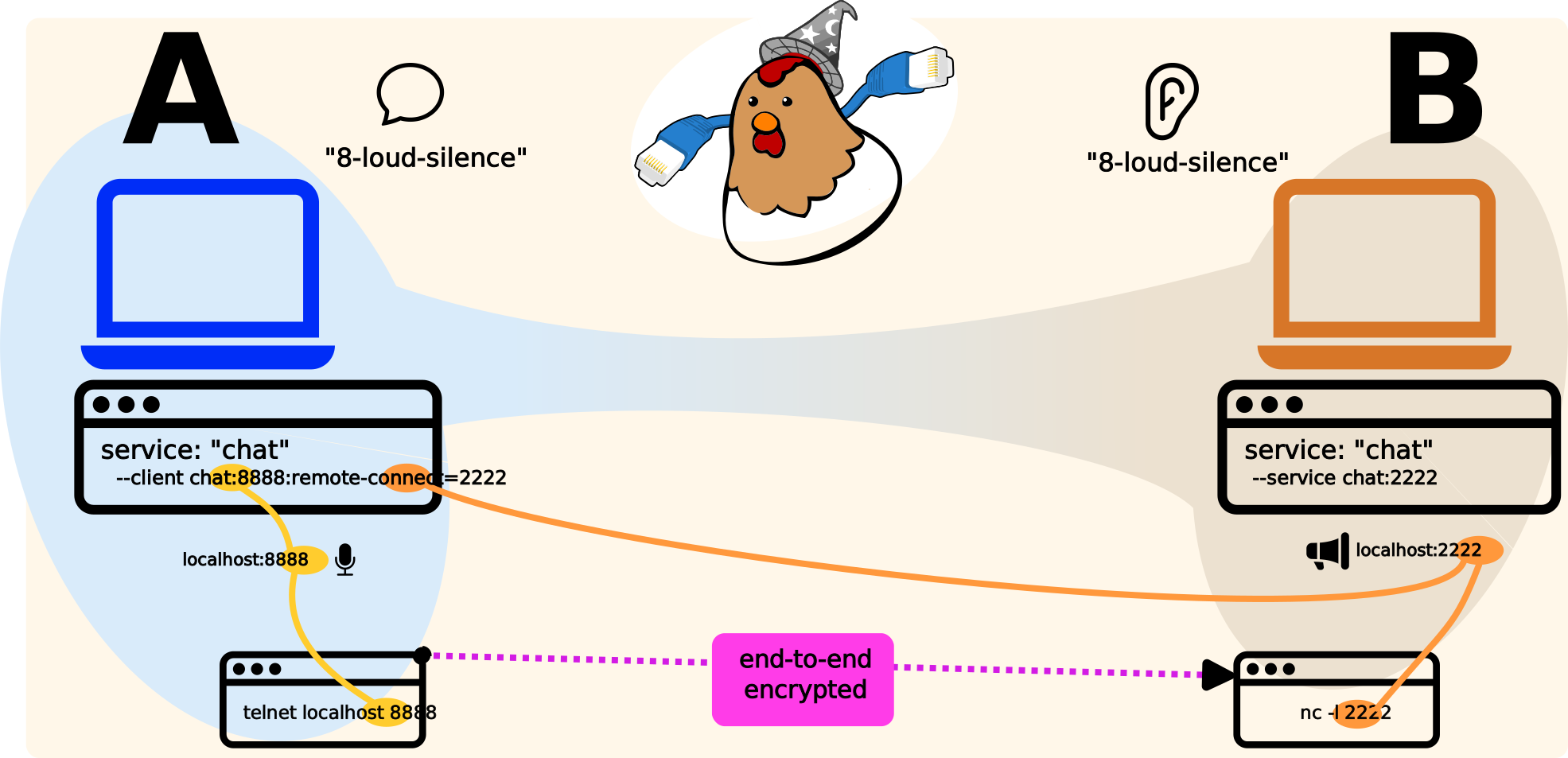
This diagram depicts two peers (“A” and “B”) connected via a Magic Wormhole across the internet. Both sides are using “fowl”, and have a single logical “Fowl service” called “chat” here. This service consists of a single forwarded connection: Peer B runs a “nc” (netcat) daemon on port 2222, while Peer A has a Fowl listener on 8888.
That is, Peer B has a “listen” style socket on port 2222 (in use by the netcat server subprocess – this could be any “daemon” style softare you like). And meantime, Peer A has a “listen” style socket on port 8888, in use by the Fowl Python process.
When the “telnet” process on Peer A connects to this Fowl listener on localhost:8888, the connection is forwarded across the wormhole, and the Fowl instance on Peer B connects locally to localhost:2222 – where the server is running.
This is the magic: Peer A is connected to Peer B’s server, with both peers using only “localhost” as the host-name. Network traffic is streamed across the Magic Wormhole.
So, to recap, we have:
one “Fowl service” called “chat”
…which consists of one forwarded connection
…using port 2222 on the “host” peer (Peer B), and port 8888 on the “guest” peer (Peer A)
Well-behaved “Fowl service” code will be written so that two or more Fowl services may be composed together over one Wormhole. For example, we might want to do “git withme” as well as “shwim” (shell-with-me) on the same wormhole, to accomplish “peer to peer pair programming”
What About the API?
Okay, there are actually several “levels” at which to consider the API:
FowlCoop/create_coop(): close to the network, use Python to interact;fowldrun Fowl as a subprocess for interoperation with any programming language;fowlCLI for use by humans
The API: _FowlCoop
Continuing the bird theme, the core of the Fowl API closest to the network / Twisted is a _FowlCoop, created using the create_coop() API call.
Each _FowlCoop instance logically represents a cohesive set of services – which will consist of at least one forwarded stream.
Each “service” inside a FowlCoop has a unique name and consists of two pieces, one on each peer:
- running server software (aka “daemon”), on some localhost port;
- and a Fowl listener on some localhost port
We use the words “fledge” and “roost” as opposites to differentiate these two aspects of a service.
So, for a service named "foo" one peer must call fledge("foo", ...) and the other must call roost("foo", ...).
The peer that calls fledge() arranges to run the “server style” software (usually as a subprocess listening on localhost, although a Twisted listener in the same process is also possible).
The other peer – the one that calls roost() – will connect to some port that Fowl is listening on.
If you are creating a service that others might wish to compose, you’ll likely want to provie an API that takes a _FowlCoop instance and sets up its services.
E.g. def create_my_service(fowl_coop, ...):
Fowl runs on top of Magic Wormhole, so it requires a wormhole instance to operate – we leave the creation of this Wormhole (via wormhole.create()) up to the application developer.
We in fact require a wormhole._DeferredWormhole instance that has a dilate() method.
At some point, it is necessary to call dilate() on the wormhole in order to enable Dilation (dilate() must be called precisely once).
Each FowlCoop is kind-of like the “builder” pattern.
So the actual “build” function is the thing that calls dilate() (adding configured services to the wormhole).
That is: you call wormhole.create() and pass the result of that to create_coop.
To complete the setup (i.e. after adding all your services by calling fledge() or roost() as many times as necessary) you call _FowlCoop.dilate().
This async function ultimately returns the DilatedWormhole instance that .dilate() itself returns – after doing all setup necessary to use all of the services this _FowlCoop instance contains.
When setting up services, you call fledge() and roost().
Only a (unique) “name” parameter for each service is required.
When not provided explicitly, all ports are randomly selected unused localhost TCP ports.
Sometimes, services (such as Web things) require ports on both sides to be the same – we thus allow for a “desired port” to be passed.
The ports actually used may be learned from the FowlChannelDaemonThere or FowlChannelDaemonHere instance returned by roost() and fledge(), respectively.
An API Example: chat
Let us consider a generic “chat” service using nc on the “listen” side and telnet on the “connect” side.
As per above, the symmetry of a peer-to-peer protocol doesn’t immediately give any reason to have the “listener” on either of the peers – it’s a pretty arbitrary decision in this scenario.
Given peers “laptop” and “desktop”, we could set this up in either of these two ways:
Laptop |
FowlCoop (laptop) |
FowlCoop (desktop) |
Desktop |
|---|---|---|---|
nc -l 1234 |
.fledge(‘chat’, 1234) |
.roost(‘chat’, 4321) |
telnet localhost 4321 |
That is, we have the listener on “laptop” so we call “fledge” on that side.
In this example, we’ve given explicit ports – but one may call fledge("chat") to get a random one instead.
With this particular setup, the Fowl on “laptop” side will “request-listener” from the “desktop” side via a “fowl command”.
Another way to set this up is like this, with Desktop listening:
Laptop |
FowlCoop (laptop) |
FowlCoop (desktop) |
Desktop |
|---|---|---|---|
telnet localhost 4321 |
.roost(‘chat’, 4321) |
.fledge(‘chat’, 1234) |
nc -l 1234 |
For every Fowl service, there’s one side with a “fake” listener (provided by Fowl), and one side with a “real” listener (provided by application code). This “real” listener could be in Python + Twisted but more commonly it’s a subprocess, running like a daemon (as in the above examples).
The side upon which you call fledge or roost controls where the “real listener” is – it is always on the fledge side.
Regardless, there is only one kind of “fowl command”, and that is request-listener.
That means the peer calling fledge() will initiate the request/response command request-listener.
This means that roost() merely prepares for real work – it is lazy!
We lazily-instantiate services in case a particular application only needs them under certain circumstances.
In contrast, fledge("X") causes real work to happen – we send a command to the other Peer asking for their side to be set up.
An error will result if that other peer has not called roost("X").
Note
Readers may notice that there’s an opportunity for a race-condition here: a peer may call fledge("A") before the other peer has had a chance to call roost("A").
In general, if you set up your services immediately after dilate() this will be a difficult race to encounter – still, magic-wormhole provides a way to communicate a set of named services that are expected to exist via the expected_subprotocols= kwarg.
One way to consider this is that roost("foo") sets up permission; it is preparing a place for a fledge("foo") to land (but the other peer’s service “foo” may never “take off” at all, in which case the “roost” will go unused).